Configuring ClockworkDB
On linux, when using RPM or DEB packages, the configuration files are installed in the /opt/ctt/etc/clockworkdb/ directory. They are configured with basic settings for a WarpDrive+ repository named “warp1” that should work for most users. Follow the simple steps below to configure your environment, and run a quick test to list the repositories available.
Quick Start
Source the cdb-env.sh file to set up environment variables for ClockworkDB configuration. You should add this to your shell profile or rc file (.zshrc, .bashrc, .bash_profile, etc.):
source /opt/ctt/etc/clockworkdb/cdb-env.shTest that the configuration is set up correctly by running a ClockworkDB tool, such as the command line interface (CLI) tool cdb-repositories which lists the repositories defined in the configuration files.
Output:
#> cdb-repositories

 /\_/\
( o.o )
 > ^ <
  ____ _            _                        _    ____  ____
 / ___| | ___   ___| | ____      _____  _ __| | _|  _ \| __ )
| |   | |/ _ \ / __| |/ /\ \ /\ / / _ \| '__| |/ / | | |  _ \
| |___| | (_) | (__|   <  \ V  V / (_) | |  |   <| |_| | |_) |
 \____|_|\___/ \___|_|\_\  \_/\_/ \___/|_|  |_|\_\____/|____/
                                                        v1.0.48

    [11:32:52] [cdb-repositories] cdb-repositories Version: 0.3.3
    [11:32:52] [cdb-repositories] Repository           Description                                        Module Provider
    [11:32:52] [cdb-repositories] -------------------- -------------------------------------------------- ---------------
    [11:32:52] [cdb-repositories] warp1                WarpDrive+ Repository(2k/16k)                      mod_warpdrive
    [11:32:52] [cdb-repositories] -------------------- -------------------------------------------------- ---------------
Managing Configuration Files
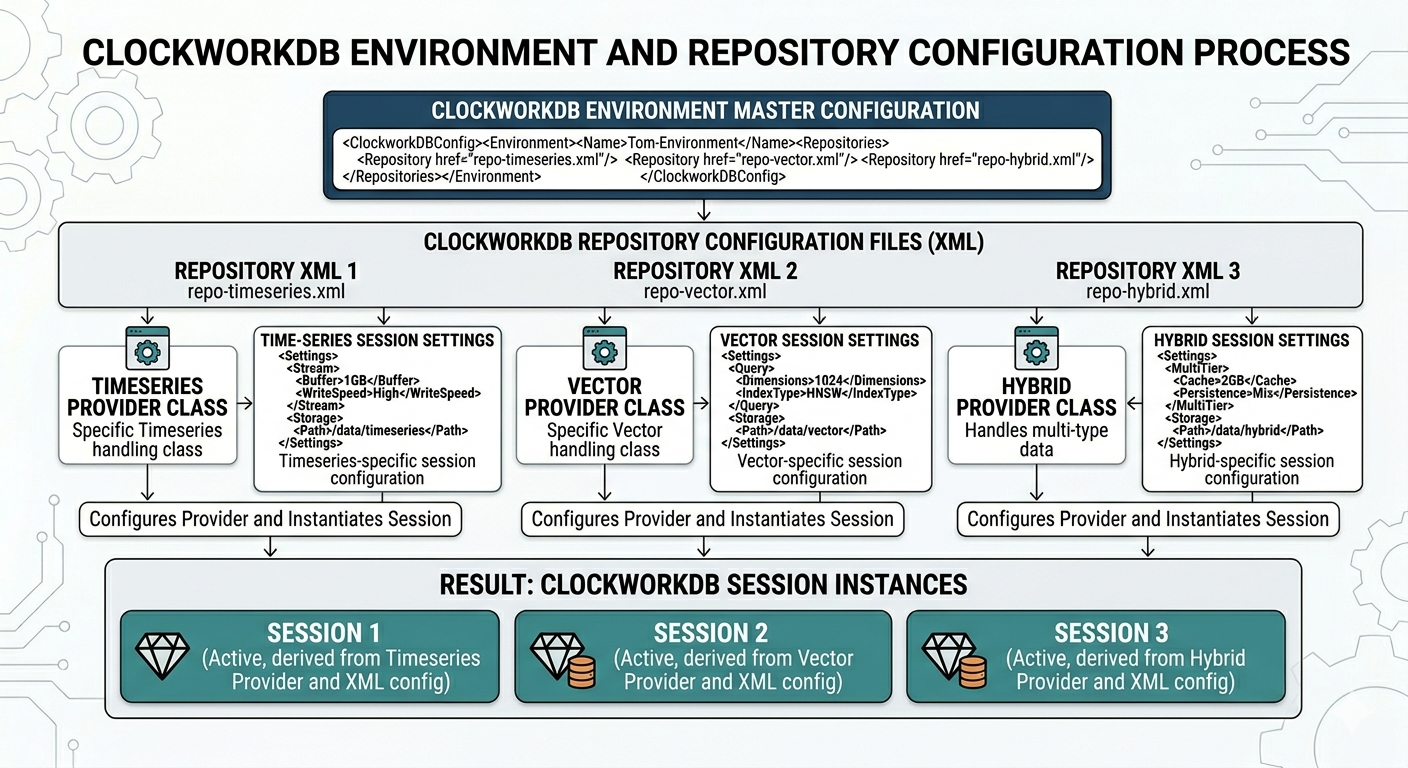
You can manage the configuration files for ClockworkDB using any text editor. The configuration files are XML files that define various settings and options for the ClockworkDB environment, repositories, and module providers that provide presistence logic for various backends.
To generate a new backend module provider configuration file, you can use the cdb-provider-config command line tool, which will create a new configuration file:
Usage: cdb-provider-config <module_provider_name>

#> cdb-provider-config mod_warpdrive
There are a number of configuration files which are used by the various tools, utilities, and programs which interact with ClockworkDB. These configuration files are XML files and one DTD file that defines ENTITYs, essentially variables used in the XML configuration files.
- cdb-env.sh file.
This is a shell script that sets environment variables to point to the ClockworkDB configuration directory, TOM_HOME, and adjusts the PATH and LD_LIBRARY_PATH environment variables to include the directories for tools and libraries. You should source this file before running any of the tools, utilities, or programs which interact with ClockworkDB.
- tom-environment.dtd file.
This file defines ENTITYs, which are essentially variables that can be used in the XML configuration files. This allows for easier management of configuration values and reduces redundancy across the XML files. Entities defined in this file can be referenced in the XML configuration files using the syntax &entity_name;.
A sample tom-environment.dtd file:
<!ENTITY support_email "support@curatedtimetech.com">
<!ENTITY install_dir "/opt/ctt/usr/">
<!ENTITY config_dir "/opt/ctt/etc/clockworkdb/">
<!ENTITY default_repo "warp1">
- tom-environment.xml file.
This file defines elements for logging, license, and clockworkdb environment configuration. When creating a new configuration file for a new repository, you can include this file via the <xi:include> directive. See the <xi:include href=”&config_dir;/cdb1.xml”> in the tom-environment.xml file for an example.
A sample tom-environment.xml file:
 <!--
 /\_/\
( o.o )
 > ^ <
  ____ _            _                        _    ____  ____
 / ___| | ___   ___| | ____      _____  _ __| | _|  _ \| __ )
| |   | |/ _ \ / __| |/ /\ \ /\ / / _ \| '__| |/ / | | |  _ \
| |___| | (_) | (__|   <  \ V  V / (_) | |  |   <| |_| | |_) |
 \____|_|\___/ \___|_|\_\  \_/\_/ \___/|_|  |_|\_\____/|____/
                                                     v1.0.48
 ClockworkDB is a high performance agnostic API for time series and vector data.
 Copyright (C) 2024 Curated Time Tech, Inc.
 -->

 <?xml version="1.0"?>
 <!DOCTYPE tom:environment SYSTEM "tom-environment.dtd">
 <tom:environment xmlns:tom="http://www.tomsolutions.com/tom/environment/1.0"
     xmlns:xi="http://www.w3.org/2001/XInclude">
     <!--
         level="trace|info|warn|error"
         type="daily|rolling"
         file="</path/to/log>" or <filename> created in the current working directory
         format=[see fmt c++ library documentation]
     -->
     <logger level="info"
         format="[%Y-%m-%d %H:%M:%S.%F%z] [%E] [%n] [Pid: %P] [Tid: %t] [%l] [%v]"
         file="/tmp/clockworkdb.log" logtype="daily"/>

     <!-- license file checked by ClockworkDB tools, utilities, and programs -->
     <license file="clockworkdb.lic" path="&config_dir;/" />

     <tsdb default-repository="&default_repo;" module-directory="&install_dir;/lib/tom-tsdb">
         <!-- Include the back end modules we are using -->
         <xi:include href="&config_dir;/cdb1.xml"/>
     </tsdb>
 </tom:environment>
- cdb1.xml file.
This file is included in the tom-environment.xml file and defines the configuration for a specific repository, in this case, a WarpDrive+ powered repository named “warp1”. This file includes options for cache size, partitioning, transactions, environment settings, locking, datastore configuration, database home directory, directories for data and logs, and replication settings.
You can find more information about the various configuration options in the Module Provider Options section of the documentation.
A sample cdb1.xml file:
<!--
    Template generated from mod_warpdrive [version: 1.0.10]
    Generated on: Tue Feb 17 12:43:10 2026
    Module Path: /opt/ctt/usr/lib/tom-tsdb
-->

<?xml version="1.0"?>
<!--
__        __               ____       _
\ \      / /_ _ _ __ _ __ |  _ \ _ __(_)_   _____   _
 \ \ /\ / / _` | '__| '_ \| | | | '__| \ \ / / _ \_| |_
  \ V  V / (_| | |  | |_) | |_| | |  | |\ V /  __/_   _|
   \_/\_/ \__,_|_|  | .__/|____/|_|  |_| \_/ \___| |_|
                    |_|
WarpDrive+ is a high performance embedded database for time series and vector data.
Copyright (C) 2024 Curated Time Tech, Inc.
-->

<!-- Definition of an WarpDrive+ repository
name=[unique:string]        value used to identify discrete repo in engine.get_session('name')
module="mod_warpdrive"      The module(.so|.dll) that manages the WarpDrive+ environment.
description="<any>" Anything that describes this repository. Market data, Fed Data...
-->
<repository name="warp1" module="mod_warpdrive" description="WarpDrive+ Data (2k/16k)">
<options>

<!--
    This specifies the amount of memory for caching in the db environment.
    This is shared by all databases within the environment, but not across
    separate db environments.
    NOTE: This should be a power of 2!  Sizes < 500M are rounded up 25% for overhead.
    max-mmap-size: This is the maximum part of the cache to mem-map into the process space
    [CONTENT]: The total size of cache memory for the environment subsystems (lock/write-ahead-log/transactions)
-->
<cache-size max-mmap-size-gigs="1" cache-segments="1"
            max-cache-gigs="1" init-cache-gigs="1"/>

<!-- Use datastore partitioning
    use=[0|1] 1 turns on partitioning
    num-partitions=[1-64] Number of partitions to use
    hash-strategy=[substr,0,4] The hashing strategy to use. substr,0,4 means take the first 4 characters of the key
    partition-dirs=[dir1,dir2,dir3,...] The directories to use for the partitions
-->
<partitioning use="0" num-partitions="6" hash-strategy="substr,0,4" partition-dirs="data1,data2,data3,data4,data5,data6"/>

<!--
    For threaded performance, it is often beneficial to break environments into sub-enviornments
    so the locking subsystems have less contention
    enable="[0|1]": turn on(1) or off(0)
    slice-count="<N>": the number of cpu cores is a good choice
    slice-on-dimension=[0|1]: split data using the entire object name or the 1st dimension (part before the first '.')
    cache-size="<n>Gig.<bytes>": the size of the cache for each slice of environment
    cache-regions="<n>": break the cache into N contiguous regions

    -->
<slices enable="0" slice-count="10" slice-on-dimension="1" cache-size="0.536870912" cache-regions="1"/>

<!--
    Will the environment be transactionally protected
    use: Turn on transactions
    write-ahead-logging: Use write-ahead logging to guarantee durability w/in ACID semantics
    timeout: The amount of time to wait for a transaction to complete or fail, in microseconds
-->
<transactions use="1" write-ahead-logging="1" timeout="10000"/>

<!--
    Some options to control the workings of the environment and dbs
    direct-db: turn off double buffering in the file-system
    multiversion: enable multiversion support in db
    no-mmap: don't memory map db pages into user/process space w/ mmap
    db-region-init: initialize data structures, preloading into memory for env
    auto-commit: automatically wrap all db operations in a transaction
    txn-nosync: don't write or sync txn log entries on transaction commits
    txn-write-nosync: write, but don't sync log entries on transaction commits
    auto-recover=[0|1] Cleanup environment support files. This will be ignored
                        if replication is in use and this is not the master
    mlock-files: mlock mmap'd databases and environment files into memory
    use-sysv-ipc: instead of memory mapping files for cache, use System V Interprocess Comms
    sysv-ipc-key: unique id for System V IPC memory
-->
<environment direct-db="0" multiversion="0" no-mmap="0" db-region-init="1"
                auto-commit="0" txn-nosync="1" txn-write-nosync="1"
                auto-recover="0" mlock-files="1" use-sysv-ipc="0" sysv-ipc-key="55"/>

<!--
    Configure locking. This is important for both heavily threaded applications and
    many and/or massive multi-process shared environments.  If you find frequent lock
    failures, try increasing timeout(in microseconds) or increase the lock/lockers/objects
    accross the board.
-->
<locking max-lockers="1200" max-locks="1200" max-objects="1200" timeout="10000"/>

<!-- timeseries are stored in chunks on datastore pages
    chunk-size=[n] n should be a power of 2. a datastore, once created, cannot change
                        chunk-size.
    page-size=[n] n should be a power of 2. a datastore locks pages, so pages should
                    be large enough to hold several chunks, but not so big that lock
                    contention becomes an issue for multi-threaded programs.
    NOTE: On most modern day hardware the hardware page size most widely used is 4096(4K) bytes.
        It would be wise to pick chunk size and page size with that in mind.
        If this baffles you, go find someone who understands hardware ;)
-->
<datastore chunk-size="2048" page-size="16384" compress="0" compress-algo="lz4" compress-level="12"/>

<!--
    This specifies the root directory for database files.
    dbs should be openned relative to this path.
    mode: POSIX file permision flag when creating new databases
    paths-relative-to: any database created, deleted, or openned will live under the
                        specified directory in content
    [CONTENT]: The path where the database environment files live
    -->
<db-home mode="666" paths-relative-to="1">/opt/ctt/usr/data/warp1</db-home>

<!--
    Where will various environment files live
    data-dir: the sub-directory of the db-home where database files live
    shared-memory-region-dir: locking/transaction/cache files live here
    log-dir: write-ahead log files live here to support Durability
    NOTE: ACID semantics supported. This is a standard requirement of enterprise database systems
    ACID: Atomicity Concurrent Isolation Durability. Google it if you need.
    WarpDrive+ supports both ACI and full ACID semantics
    WarpDrive+ also supports multi-version databases that maintain multiple views of the same
        data depending on the isolation of the applicable given transaction unit
-->
<directories data-dir="data" shared-memory-region-dir="regions" log-dir="logs"/>

<!--
    Configure replication:
    use=[0|1]  1 turns on replication
    master=[0|1] Should almost always be 0. 1 is reserved for the master in the replication group
    priority=[<a number>] Higher number get priority to be master if the master falls over
    port=[0-64k] Port to listen on
    verbose=[0|1] Turns on replication debugging
    auto-init=[0|1] Whether or not to re-init out of data replicas
    bulk-transfers=[0|1] Accumulate changes in a buffer before doing network transfers
    ack-policy: Strategy for considering how many/type of ACKs come in for cloud update
-->
<replication use="0" master="1" priority="150" port="3500" verbose="1" auto-init="1"
    bulk-transfers="1" ack-policy="quorum">

    <master host="localhost" port="3500"/>

    <peers>
    <peer host="localhost" port="3501"/>
    <peer host="localhost" port="3502"/>
    <peer host="localhost" port="3503"/>
    </peers>
</replication>

</options>
</repository>