Command-Line Utilities
There are many command-line utilities included with ClockworkDB that allow you to interact with the engine, repositories, datastores, and data using command-line commands. These utilities are designed to be easy to use and provide a powerful way to manage your ClockworkDB environment without needing to write code.
List Repositories
The cdb-repositories utility allows you to list all the repositories that are currently configured in your environment. This is a great way to quickly see what repositories are available and get information about them, such as their names, types, and providers. You can run this utility from the command line, and it will display a table of all the configured repositories in your environment.:
 > cdb-repositories --help
 Options:
     -h, --help        Help
     --no-banner       Don't print the banner
     -l, --linux-logo  Show the output of linuxlogo - dist/cpu/etc

 > cdb-repositories

 /\_/\
( o.o )
 > ^ <
  ____ _            _                        _    ____  ____
 / ___| | ___   ___| | ____      _____  _ __| | _|  _ \| __ )
| |   | |/ _ \ / __| |/ /\ \ /\ / / _ \| '__| |/ / | | |  _ \
| |___| | (_) | (__|   <  \ V  V / (_) | |  |   <| |_| | |_) |
 \____|_|\___/ \___|_|\_\  \_/\_/ \___/|_|  |_|\_\____/|____/
                                                     v1.1.48

 [11:32:52] [cdb-repositories] Repository Name       Repository Type                               Provider Name
 [11:32:52] [cdb-repositories] -------------------- -------------------------------------------- ---------------
 [11:32:52] [cdb-repositories] warp1                WarpDrive+ Repository(2k/16k)                      mod_warpdrive
 [11:32:52] [cdb-repositories] -------------------- -------------------------------------------------- ---------------
List Datastores
The cdb-datastores utility allows you to list all the datastores that are currently configured in your environment. This is a great way to quickly see what datastores are available and get information about them, such as their names, types, and associated repositories. You can run this utility from the command line, and it will display a table of all the configured datastores in your environment.:
 > cdb-datastores --help
 Options:
     -h, --help        Help
     -r, --repo arg    Respository Name
     --no-banner       Don't print the banner
     -l, --linux-logo  Show the output of linuxlogo - dist/cpu/etc.

 > cdb-datastores -r warp1

 /\_/\
( o.o )
 > ^ <
  ____ _            _                        _    ____  ____
 / ___| | ___   ___| | ____      _____  _ __| | _|  _ \| __ )
| |   | |/ _ \ / __| |/ /\ \ /\ / / _ \| '__| |/ / | | |  _ \
| |___| | (_) | (__|   <  \ V  V / (_) | |  |   <| |_| | |_) |
 \____|_|\___/ \___|_|\_\  \_/\_/ \___/|_|  |_|\_\____/|____/
                                                     v1.1.48

 [22:18:55] [cdb-datastores] cdb-datastores      Version: 0.3
 [22:18:55] [cdb-datastores] Repository: warp1
 [22:18:55] [cdb-datastores] -----------------------------------------------------------------------------------------------------------------------------
 [22:18:55] [cdb-datastores] Datastore                      Created                Modified               Description
 [22:18:55] [cdb-datastores] ------------------------------ ---------------------- ---------------------- ------------------------------------------------
 [22:18:55] [cdb-datastores] co-insider-transactions.wdb    2024-Jun-23 10:39:28   2024-Jun-23 10:39:28   Insider Transactions
 [22:18:55] [cdb-datastores] co-logo.wdb                    2025-Mar-19 00:26:16   2025-Mar-19 00:26:16   Company Logos
 [22:18:55] [cdb-datastores] co-news.wdb                    2024-Jun-23 22:00:56   2024-Jun-23 22:00:56   Company News
 [22:18:55] [cdb-datastores] co-peers.wdb                   2024-Jun-22 18:27:25   2024-Jun-22 18:27:25   Company Peers
 [22:18:55] [cdb-datastores] co-profile.wdb                 2024-May-27 17:09:30   2024-May-27 17:09:30   Company Profiles
 [22:18:55] [cdb-datastores] co-sec-filings.wdb             2024-Jun-23 10:39:28   2024-Jun-23 10:39:28   Company SEC Filings
 [22:18:55] [cdb-datastores] fxdata.wdb                     2025-Apr-11 09:45:24   2025-Apr-11 09:45:24   FX Data
 [22:18:55] [cdb-datastores] market-news.wdb                2024-Jun-24 10:01:37   2024-Jun-24 10:01:37   Market News
 [22:18:55] [cdb-datastores] mktdata-adr.wdb                2026-Feb-26 13:23:25   2026-Feb-26 13:31:34   Market Data - ADRs+GDRs
 [22:18:55] [cdb-datastores] mktdata-alt.wdb                2026-Feb-26 13:31:34   2026-Feb-26 13:31:34   Market Data - Alternatives
 [22:18:55] [cdb-datastores] mktdata-etf.wdb                2026-Feb-26 13:13:16   2026-Feb-26 13:13:16   Market Data - ETFs
 [22:18:55] [cdb-datastores] mktdata-stk.wdb                2026-Feb-26 22:06:20   2026-Feb-26 22:06:20   Market Data - Stocks
 [22:18:55] [cdb-datastores] normal-stk.ann.wdb             2026-May-08 15:24:05   2026-May-08 15:24:05   ANN Training Data - Normalized Ln Rty Stock Data
 [22:18:55] [cdb-datastores] normal-stk.wdb                 2026-May-08 11:18:53   2026-May-08 11:18:53   Normalized Ln Rty Stock Data
 [22:18:55] [cdb-datastores] quote.wdb                      2026-Feb-25 10:31:03   2026-Feb-25 10:31:03   Quote Data
 [22:18:55] [cdb-datastores] sec-master.wdb                 2026-Feb-25 15:57:18   2026-Feb-25 15:57:18   Security Master Data
 [22:18:55] [cdb-datastores] -----------------------------------------------------------------------------------------------------------------------------
Catalog Datastores
The cdb-catalog utility allows you to list all the objects in a given datastore. This is a great way to quickly see what objects are available in a datastore, or quickly filter results with a regex (Regular Expression) pattern:
 > cdb-catalog --help
 Options:
     -h, --help             Help
     -r, --repo arg         Respository Name
     -d, --datastore arg    Datastore Name
     -x, --regex arg (=.*)  Regex Pattern

 > cdb-catalog -r warp1 -d mktdata-stk

 /\_/\
( o.o )
 > ^ <
  ____ _            _                        _    ____  ____
 / ___| | ___   ___| | ____      _____  _ __| | _|  _ \| __ )
| |   | |/ _ \ / __| |/ /\ \ /\ / / _ \| '__| |/ / | | |  _ \
| |___| | (_) | (__|   <  \ V  V / (_) | |  |   <| |_| | |_) |
 \____|_|\___/ \___|_|\_\  \_/\_/ \___/|_|  |_|\_\____/|____/
                                                     v1.1.48

 [22:48:11] [cdb-catalog] cdb-catalog Version: 0.3
 [22:48:11] [cdb-catalog] A.ADJUSTED
 [22:48:11] [cdb-catalog] A.CLOSE
 [22:48:11] [cdb-catalog] A.HIGH
 [22:48:11] [cdb-catalog] A.LOW
 [22:48:11] [cdb-catalog] A.OPEN
 [22:48:11] [cdb-catalog] A.VOLUME
 [22:48:11] [cdb-catalog] AA.ADJUSTED
 [22:48:11] [cdb-catalog] AA.CLOSE
 [22:48:11] [cdb-catalog] AA.HIGH
 [22:48:11] [cdb-catalog] AA.LOW
 [22:48:11] [cdb-catalog] AA.OPEN
 [22:48:11] [cdb-catalog] AA.VOLUME
 ...
 [22:48:11] [cdb-catalog] ZWS.ADJUSTED
 [22:48:11] [cdb-catalog] ZWS.CLOSE
 [22:48:11] [cdb-catalog] ZWS.HIGH
 [22:48:11] [cdb-catalog] ZWS.LOW
 [22:48:11] [cdb-catalog] ZWS.OPEN
 [22:48:11] [cdb-catalog] ZWS.VOLUME
 [22:48:11] [cdb-catalog] ZYBT.ADJUSTED
 [22:48:11] [cdb-catalog] ZYBT.CLOSE
 [22:48:11] [cdb-catalog] ZYBT.HIGH
 [22:48:11] [cdb-catalog] ZYBT.LOW
 [22:48:11] [cdb-catalog] ZYBT.OPEN
 [22:48:11] [cdb-catalog] ZYBT.VOLUME
 [22:48:11] [cdb-catalog] ZYME.ADJUSTED
 [22:48:11] [cdb-catalog] ZYME.CLOSE
 [22:48:11] [cdb-catalog] ZYME.HIGH
 [22:48:11] [cdb-catalog] ZYME.LOW
 [22:48:11] [cdb-catalog] ZYME.OPEN
 [22:48:11] [cdb-catalog] ZYME.VOLUME
 [22:48:11] [cdb-catalog] Time Series Count: 29364

 > cdb-catalog -r warp1 -d mktdata-stk -x 'nvda.*'

 /\_/\
( o.o )
 > ^ <
  ____ _            _                        _    ____  ____
 / ___| | ___   ___| | ____      _____  _ __| | _|  _ \| __ )
| |   | |/ _ \ / __| |/ /\ \ /\ / / _ \| '__| |/ / | | |  _ \
| |___| | (_) | (__|   <  \ V  V / (_) | |  |   <| |_| | |_) |
 \____|_|\___/ \___|_|\_\  \_/\_/ \___/|_|  |_|\_\____/|____/
                                                     v1.1.48

 [22:52:43] [cdb-catalog] cdb-catalog Version: 0.3
 [22:52:43] [cdb-catalog] NVDA.ADJUSTED
 [22:52:43] [cdb-catalog] NVDA.CLOSE
 [22:52:43] [cdb-catalog] NVDA.HIGH
 [22:52:43] [cdb-catalog] NVDA.LOW
 [22:52:43] [cdb-catalog] NVDA.OPEN
 [22:52:43] [cdb-catalog] NVDA.VOLUME
 [22:52:43] [cdb-catalog] Time Series Count: 6
Timeseries/Vector Meta Data
The cdb-ts-meta utility allows you to list all the meta data for a given object in a given datastore. This is a great way to quickly see what meta data is available for an object:
 > cdb-ts-meta --help
 Options:
     -h, --help           Help
     --no-banner          Don't print the banner
     -r, --repo arg       Respository
     -d, --datastore arg  Datastore
     -o, --object arg     Object

 > cdb-ts-meta -r warp1 -d mktdata-stk -o nvda.open

 /\_/\
( o.o )
 > ^ <
  ____ _            _                        _    ____  ____
 / ___| | ___   ___| | ____      _____  _ __| | _|  _ \| __ )
| |   | |/ _ \ / __| |/ /\ \ /\ / / _ \| '__| |/ / | | |  _ \
| |___| | (_) | (__|   <  \ V  V / (_) | |  |   <| |_| | |_) |
 \____|_|\___/ \___|_|\_\  \_/\_/ \___/|_|  |_|\_\____/|____/
                                                     v1.1.48

 [23:10:27] [cdb-ts-meta] Version: 0.3
 [23:10:27] [cdb-ts-meta] Name           : NVDA.OPEN
 [23:10:27] [cdb-ts-meta] Create Date    : 2024-Jun-28 21:48:40
 [23:10:27] [cdb-ts-meta] Modify Date    : 2026-May-21 06:33:04
 [23:10:27] [cdb-ts-meta] First Date     : 38889 1999-Jan-22 0.0437499993
 [23:10:27] [cdb-ts-meta] Last Date      : 46017 2026-May-20 223.179993
 [23:10:27] [cdb-ts-meta] Data Type      : Float
 [23:10:27] [cdb-ts-meta] Agg Type       : End
 [23:10:27] [cdb-ts-meta] Calendar       : Business
 [23:10:27] [cdb-ts-meta] Aliases        : None
Timeseries/Vector Data
The cdb-ts utility allows you to show all the data for a given object in a given datastore. This is a great way to quickly see what data is available for an object:
> cdb-ts --help
Options:
    -h, --help                          Help
    -r, --repo arg                      Respository
    -d, --datastore arg                 Datastore
    -o, --object arg                    Object
    -t, --frequency arg (=b)            Frequency of observations
    -f, --format arg (={:6d}[{}]: {:6.2f})
                                        Output Format
    --values-only                       Show values only
    -l, --linux-logo                    Show the output of linuxlogo - dist/cpu/etc.
    -m, --meta                          Add Meta Data to the end
    --no-banner                         Do not display the banner
    -g, --one-date arg                  Get the value on just one date
    -b, --first-date arg                Show dates starting at...
    -e, --last-date arg                 Show dates ending at...
    --plot                              Plot data using gnuplot [must be installed and in path]
Show all data for an object:
> cdb-ts -r warp1 -d mktdata-stk -o nvda.open

[23:16:49] [cdb-ts] Version 0.3
[23:16:49] [cdb-ts]  38889[1999-Jan-22]:   0.04
[23:16:49] [cdb-ts]  38890[1999-Jan-25]:   0.04
[23:16:49] [cdb-ts]  38891[1999-Jan-26]:   0.05
[23:16:49] [cdb-ts]  38892[1999-Jan-27]:   0.04
[23:16:49] [cdb-ts]  38893[1999-Jan-28]:   0.04
[23:16:49] [cdb-ts]  38894[1999-Jan-29]:   0.04
...
[23:18:06] [cdb-ts]  46010[2026-May-11]: 214.04
[23:18:06] [cdb-ts]  46011[2026-May-12]: 218.55
[23:18:06] [cdb-ts]  46012[2026-May-13]: 224.93
[23:18:06] [cdb-ts]  46013[2026-May-14]: 229.85
[23:18:06] [cdb-ts]  46014[2026-May-15]: 229.76
[23:18:06] [cdb-ts]  46015[2026-May-18]: 229.87
[23:18:06] [cdb-ts]  46016[2026-May-19]: 219.62
[23:18:06] [cdb-ts]  46017[2026-May-20]: 223.18
Plot data from 2020-01-01 to 2026-05-22:
> cdb-ts -r warp1 -d mktdata-stk -o nvda.open -b 2020-01-01 -e 2026-05-22 --plot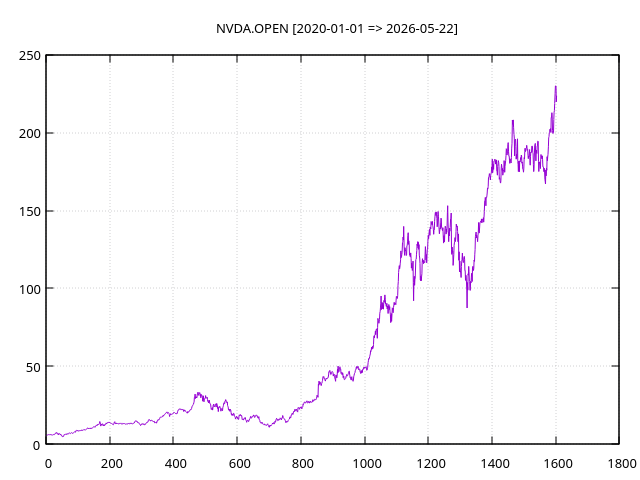
Plot data from 2020-01-01 to 2026-05-22 scaled weekly:
> cdb-ts -r warp1 -d mktdata-stk -o nvda.open -b 2020-01-01 -e 2026-05-22 --plot -t w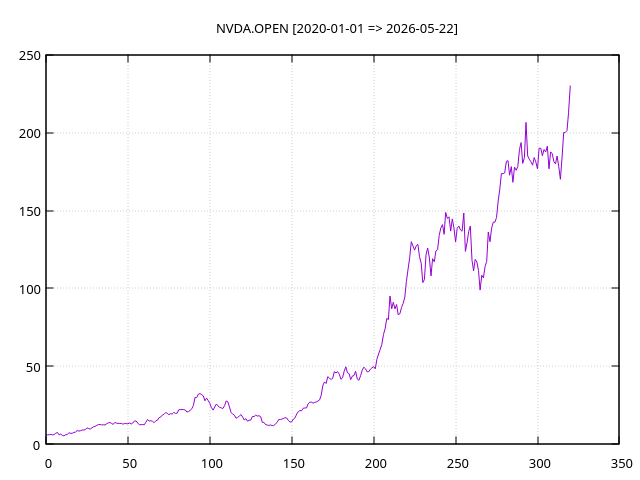
Migrating Data
The cdb-migrate utility allows you to migrate data from one datastore to another datastore. This is a great way to move data between datastores, or to create a backup of your data in another location. You can run this utility from the command line, and it will migrate all the data for a given object from one datastore to another datastore:
> cdb-migrate --help
Options:
    -h, --help             Help
    -r, --repo1 arg        Source Respository
    -s, --repo2 arg        Destination Respository
    -d, --datastore1 arg   Source Datastore
    -e, --datastore2 arg   Destination Datastore
    -x, --regex arg (=.*)  Regex describing what to migrate
Backup close and volume stock market data from the WarpDrive+ repository to an Oracle repository:
> cdb-migrate -r warp1 -s oracle -d mktdata-stk -e mktdata-stk -x '.*\.(close|volume)'

[23:51:53] [cdb-migrate] cdb-migrate    Version: 0.3
[23:51:53] [cdb-migrate] Copy: AA.CLOSE
[23:51:53] [cdb-migrate] Copy: AA.VOLUME
[23:51:53] [cdb-migrate] Copy: AACB.CLOSE
[23:51:53] [cdb-migrate] Copy: AACB.VOLUME
[23:51:53] [cdb-migrate] Copy: AAL.CLOSE
[23:51:53] [cdb-migrate] Copy: AAL.VOLUME
[23:51:53] [cdb-migrate] Copy: AAME.CLOSE
[23:51:53] [cdb-migrate] Copy: AAME.VOLUME
[23:51:53] [cdb-migrate] Copy: AAMI.CLOSE
[23:51:53] [cdb-migrate] Copy: AAMI.VOLUME
...
[23:54:27] [cdb-migrate] Copy: ZYBT.CLOSE
[23:54:27] [cdb-migrate] Copy: ZYBT.VOLUME
[23:51:53] [cdb-migrate] Copy: ZYME.CLOSE
[23:51:53] [cdb-migrate] Copy: ZYME.VOLUME
Logging from Scripts
The cdb-log utility allows you to log messages to the ClockworkDB logging system from your own scripts and programs. This is a great way to integrate your own logging with the ClockworkDB logging system, and have all your logs in one place. You can use this utility to log messages at different levels (e.g. INFO, WARNING, ERROR), and include additional context such as timestamps, repository names, datastore names, and object names. This can be very useful for debugging and monitoring your scripts and programs that interact with ClockworkDB.:
> cdb-log --help
Allowed options:
    -h [ --help ]         produce help message
    -d [ --domain ] arg   domain of logger
    -l [ --level ] arg    [ debug | info | warn | error | fatal ]

> cdb-log -d myscript -l info "This is an informational message from my script."

# From the configured log file for the environment, you would see a new log entry like this:
[2026-05-22 23:23:30.224816961-04:00] [1779506610] [tom.warpdrive] [Pid: 3170449] [Tid: 3170449] [info] [Closing IrDB Environment at: /home/tmccubbin/usr/local/irdata]
[2026-05-22 23:40:47.919461404-04:00] [1779507647] [tom.environment] [Pid: 3188862] [Tid: 3188862] [info] [configured using /home/tmccubbin/.tom/tom-environment.xml]
[2026-05-22 23:40:47.919470721-04:00] [1779507647] [myscript] [Pid: 3188862] [Tid: 3188862] [info] [This is an informational message from my script.]
Other Utilities
There are many other utilities included with ClockworkDB that provide various functionality for managing your environment, repositories, datastores, and data. You can find more information about these utilities in the documentation, and you can run them from the command line to see what options they have and how they work.